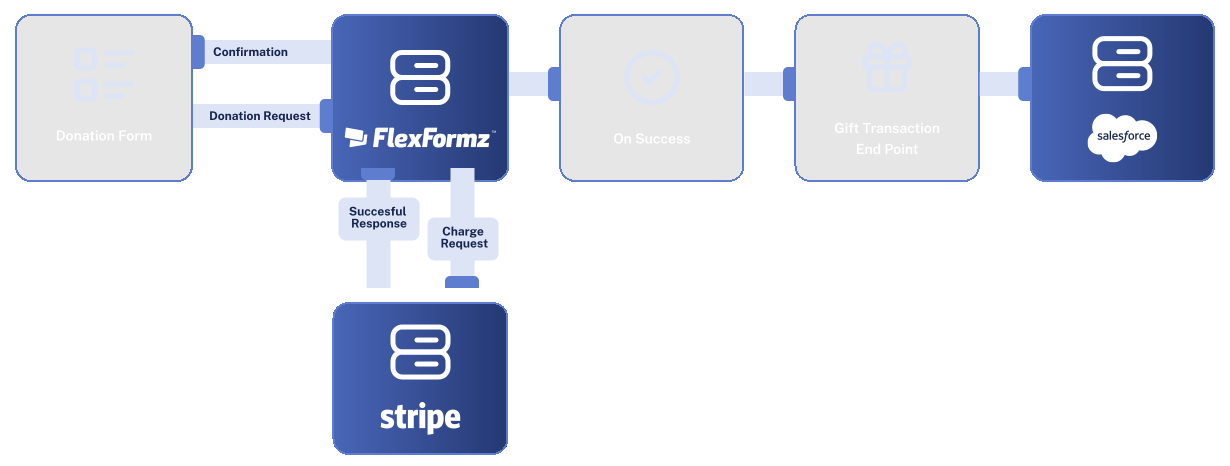
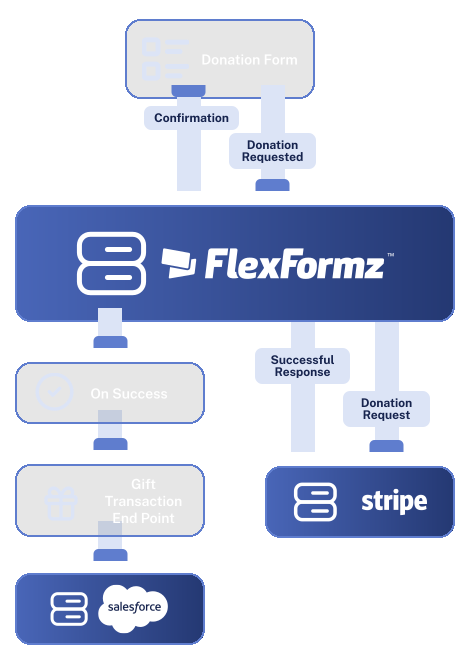
FlexFormz syncs donation data directly into Salesforce in real time, whether you’re running Nonprofit Success Pack or Nonprofit Cloud. Keep donor records, opportunity pipelines, and campaign reporting always current, so your team spends less time on data entry and more time on what matters.


FlexFormz connects directly to Salesforce via API, automatically routing donation and contact data to the correct records at the moment a form is submitted. No manual exports, no middleware — just clean, reliable data flowing into your CRM.

FlexFormz is fully compatible with both Salesforce editions used by nonprofits. If your organization runs Nonprofit Success Pack, FlexFormz maps data to NPSP’s standard objects (Contacts, Opportunities, Campaigns, and Recurring Donations). If you’ve migrated to Nonprofit Cloud, FlexFormz routes data to the updated object model. Your integration works regardless of which version your Salesforce org is on.

Before creating a new Contact or Lead, FlexFormz checks for an existing record in Salesforce using the email address as the matching key. If a match is found, the record is updated automatically, keeping your database clean and avoiding duplicate donor profiles.

Custom Fields let you map any field captured in FlexFormz directly into Salesforce records. Define which fields sync, how they’re labeled, and which Salesforce object they populate; keeping your CRM data structured exactly the way your team needs it.
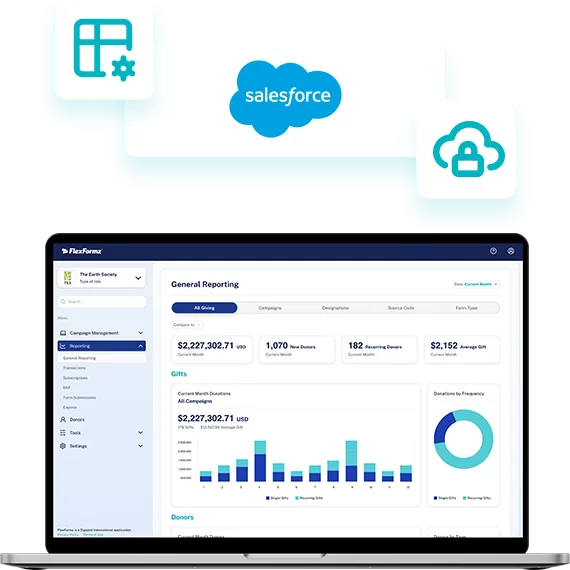

Connecting FlexFormz to Salesforce takes only a few steps inside your dashboard. No developers, no technical configuration, and no third-party tools needed. Most teams complete the setup in under 15 minutes.
Sometimes you need immediate clarity. Our FAQs provide quick answers to common questions about setup, support, integrations, security and ongoing care.
Yes. FlexFormz supports both Salesforce Nonprofit Success Pack (NPSP) and Salesforce Nonprofit Cloud. The integration automatically maps data to the correct object model based on your Salesforce environment, no extra configuration needed.
Most teams are fully connected in under 15 minutes. No coding or developer support is required, just follow the step-by-step setup guide in our documentation.
FlexFormz syncs donation records, gift designations, recurring gift data, tribute and memorial details, campaign attribution, and any custom fields you’ve mapped through Custom Fields.
FlexFormz checks for an existing Contact or Lead in Salesforce using email address as the matching key before creating a new record. If a match is found, the existing record is updated automatically keeping your database clean and free of duplicates.
Yes. By default, FlexFormz sends data to Salesforce the moment a donation or form submission is received.
Yes. FlexFormz processes donations in multiple currencies and passes the correct currency data through to Salesforce, so your opportunity records and reports stay accurate regardless of where your donors are located.
Yes. That’s what Custom Fields are for. You decide which form fields sync, how they’re labeled, and which Salesforce object and field they map to. This works for both standard and custom fields in your Salesforce org.
Our support team is available via email. We also offer a full documentation library and step-by-step guides for the Salesforce integration.

If you don’t see your questions, our team is always ready to help. Our support team is available to guide you through every step of the integration — from initial setup to advanced field mapping. Whether you prefer, email, or documentation, help is always within reach.










Experience the time-saving power of seamless integrations.
When your technology works together, your mission moves forward.
© 2026 FlexFormz